How to Download and Access Your Music
- To download a track or album, find one of the download icons and click on it to start the download process.
 Lo BoierPatrick Lenk
 - A pop-up will open. In the pop-up, click on “Download MP3”.Step 1Lo BoierPatrick LenkChoose Audio FormatMP3FreeWAVPremium or Buy
- The file will start downloading through your browser.
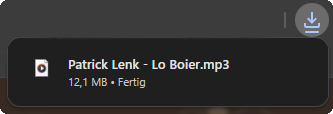
- After it finishes, find the file in your "Downloads" folder (or wherever you saved it to).
If you downloaded a single MP3 file:
- You're done! You can use it right away.
If you downloaded an album:
- It will be a ZIP file. A ZIP file is like a box with all the tracks packed inside.
- Right-click on the ZIP file.
- Choose “Extract All” or “Extract Here”.
- After extraction, you should have access to the full album in a folder or individual tracks in MP3 format.
If you can't extract the ZIP file:
- Download and install a free program called WinRar.
- After you install it, right-click the ZIP file, go to “WinRar” and click “Extract All” or “Extract Here”.
- After extraction, you should have access to the full album in a folder or individual tracks in MP3 format.
If nothing else worked:
- Go back to the album page.
- Download each song one by one by clicking the “Download” button next to each MP3 track and follow the instructions above.